

This post contains affiliate links. If you purchase through my links I earn a small commission, at no extra cost to you. I only recommend gear I have tested and would use myself.
Anker 737 Review: Best Laptop Power Bank for Remote Workers?
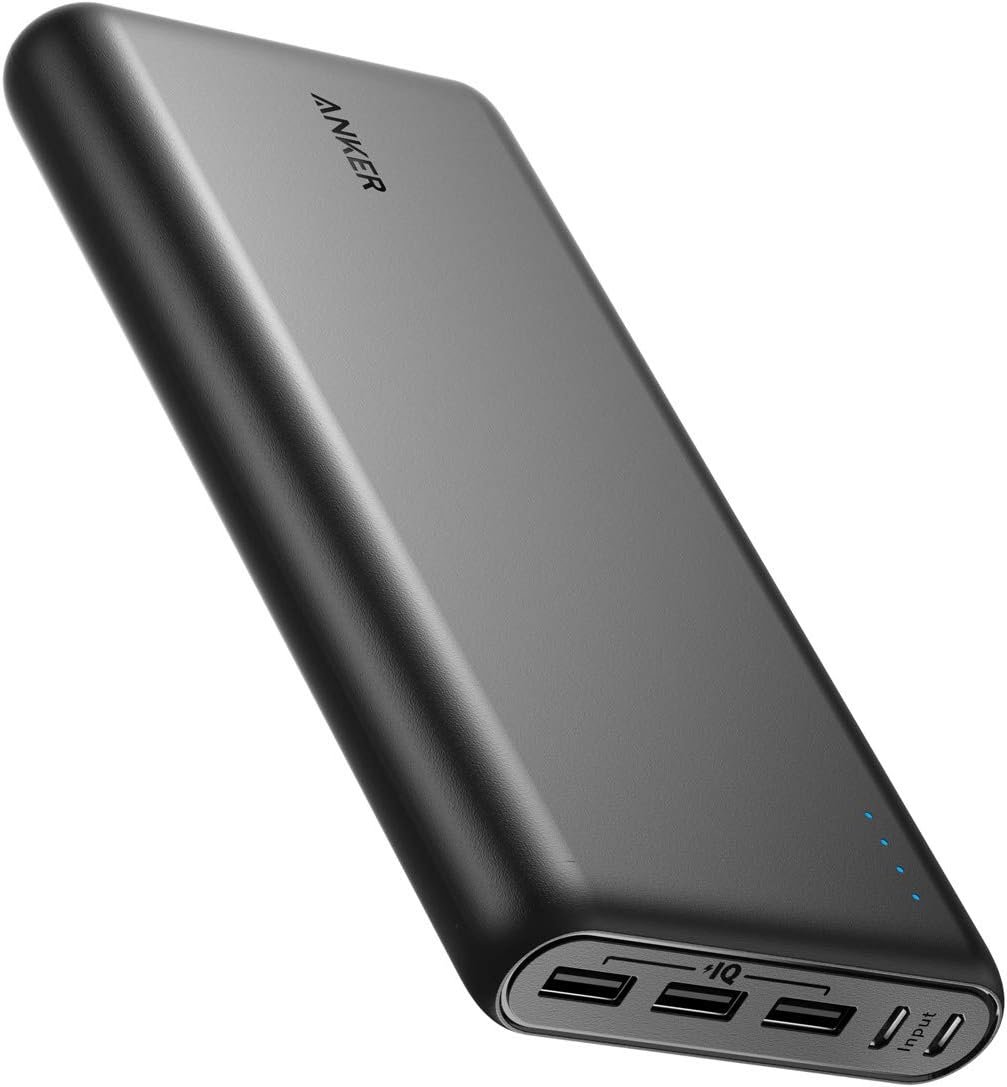
140W output, flight-approved capacity, real-time power display. The Anker 737 is built for remote professionals who need laptop-level power without hunting for outlets. Here’s whether it earns the price.
Mid-work, 14% battery, no outlets in sight — a café in Lisbon with ten tables and one socket, occupied. I had a client deadline in 90 minutes. I had a Moleskine, a coffee going cold, and no backup power. That was the last time I travelled without a dedicated laptop power bank.
The Anker 737 (PowerCore 24K) has been in my kit for the past several months, used across co-working spaces, airports, long-haul buses, and one weekend where the hostel’s power cut out entirely. This review covers what it actually does well, where it falls short, and whether it’s the right pick for how you work.
Key Specs
| Spec | Detail |
|---|---|
| Capacity | 24,000mAh (86.4Wh) — flight-approved under the 100Wh limit |
| Max Output | 140W USB-C PD 3.1 — full laptop-speed charging |
| Ports | 2× USB-C + 1× USB-A |
| Weight | ~630g |
| Self-recharge | ~1 hour with 140W wall charger (sold separately) |
| Display | Smart digital screen: exact %, real-time watt input/output, recharge estimate |
For context: most power banks cap out at 30–65W output. That’s enough for phones and tablets. It is not enough to run a MacBook Pro 14″ or a high-performance Windows laptop at full speed. The 737’s 140W spec is what separates it from the mid-tier options.
Performance for Remote Work
Laptop charging — full speed, no throttling
The 737 charges a MacBook Pro 14″, MacBook Pro 16″, and most USB-C Windows ultrabooks at the same rate as a wall adapter. You are not getting a slow trickle while your laptop continues draining — you get a genuine charge. Expect 1 to 1.5 full laptop charges per bank, depending on the model and your workload during charging.
Simultaneous device charging
Both USB-C ports are active at the same time. Running laptop + phone simultaneously works. The watt output adjusts, but the laptop holds priority. I have not found a scenario where one device starved the other to the point of net drain on the laptop.
The smart display — more useful than it sounds
Most power banks show you dots or bars. The 737 shows the exact remaining percentage, current watt input/output, and a time estimate to full recharge. When you are managing a full day of work across multiple locations, knowing you have 47% left — not “three dots” — changes how you plan your movement between spaces.
Self-recharge speed
From flat to full in approximately one hour with a compatible 140W wall charger. That is unusually fast for a 24,000mAh unit. Charge it overnight and you are covered for the following day. Charge it over a long lunch and you are back to full before the afternoon session.
Seven hours, no outlets, laptop at 40% when I boarded. Two hours of client work, one video call via hotspot, an hour of video editing. The 737 kept the MacBook Pro 14″ at working charge the entire journey. Arrived in Porto with 18% left on the bank. No outlet anxiety. No degraded workflow.
Pros and Cons
- True 140W output — not marketed speed, actual delivered speed
- Smart display eliminates battery guesswork entirely
- ~1 hour self-recharge is the best in this capacity class
- 86.4Wh capacity — flight-approved on all major carriers
- Build quality is noticeably premium for daily carry
- 630g — heavier than standard power banks; noticeable in a small daypack
- The 140W wall charger is sold separately — annoying at this price point
- Premium pricing: significantly above mid-tier alternatives
- Bulky enough that it takes dedicated space — not a slip-in-a-pocket item
Who Should Buy This
Buy it if:
You work remotely full-time and your laptop is your income. You travel long-haul frequently. You work in cafés, co-working spaces, airports, or anywhere outlet access is unreliable. You edit video or run heavy software that drains a battery quickly. You want to stop managing power anxiety during the workday.
Skip it if:
You primarily charge phones and tablets — a lighter, cheaper bank handles that. You rarely work outside a fixed setup. You travel with a strict ultralight philosophy where every gram is scrutinised. If the weight is a genuine constraint, the UGREEN alternative below is worth considering.
Anker 737 vs UGREEN 25000mAh
| Feature | Anker 737 (24K) | UGREEN 25000mAh |
|---|---|---|
| Capacity | 24,000mAh / 86.4Wh | 25,000mAh / ~90Wh |
| Max Output | 140W PD 3.1 | 145W total (split ports) |
| Display | Advanced: %, watts, time estimate | Basic: power level + watt display |
| Recharge | ~1 hour (140W) | ~1.5–2 hours |
| Weight | ~630g | ~505–550g |
| Build quality | Premium | Good for the price |
| Price | Higher | More accessible |
The honest comparison: The UGREEN delivers almost identical laptop-charging performance at lower cost and lower weight. If budget and grams are real constraints, it is a rational choice. The Anker 737 wins on display quality, recharge speed, and build finish — differences that matter if you use this device daily across extended trips.
Affiliate → Check current price of the Anker 737 on Amazon ↗The weight is real. The price is real. Both are justified if you work remotely full-time and travel frequently. This is not a power bank for occasional use — it is infrastructure. Treat it accordingly and it will not let you down.
→ Check current price on Amazon- Building your full power setup? Start with How to Choose the Best Travel Tech for Long Trips — the system this bank fits into.
- Comparing all options? See the full Best Power Banks for Travel and Remote Work roundup.
Next up: the Anker PowerCore 26800 — more capacity, lower output ceiling. I test whether the trade-off makes sense for lighter travel setups.
Thanks very interesting blog!
Thank you, Mary Anne!
We’re doing our best to keep posting useful articles to make your life easier. Let us know if there’s anything more you’d like to see here!
Best regards,
HTT team (: