
ARZOPA Portable Monitor Review
A Budget Portable Monitor for Travel, Remote Work, and Second Screen Setups
Working from a laptop only is manageable for short periods, but over time it becomes limiting, especially if you are travelling and working at the same time. Small screens, constant tab switching, and bad posture can make work slower and more tiring.
Portable monitors are one of the easiest ways to improve a travel or remote work setup, but many of the well-known brands can be expensive. This is where budget options like the ARZOPA Portable Monitor become interesting.
In this review, we’ll look at whether the ARZOPA portable monitor is a good option for travel, remote work, and portable setups, and whether it is worth buying compared to more expensive alternatives.
This review focuses on real use for travel and remote work, not just technical specifications.
First Impressions
The ARZOPA portable monitor is usually one of the more affordable portable monitors available, and the first impression reflects that slightly — but in a good way.
Inside the box you typically get:
- The portable monitor
- USB-C cable
- HDMI cable
- Power cable
- Magnetic cover (stand)
- User manual
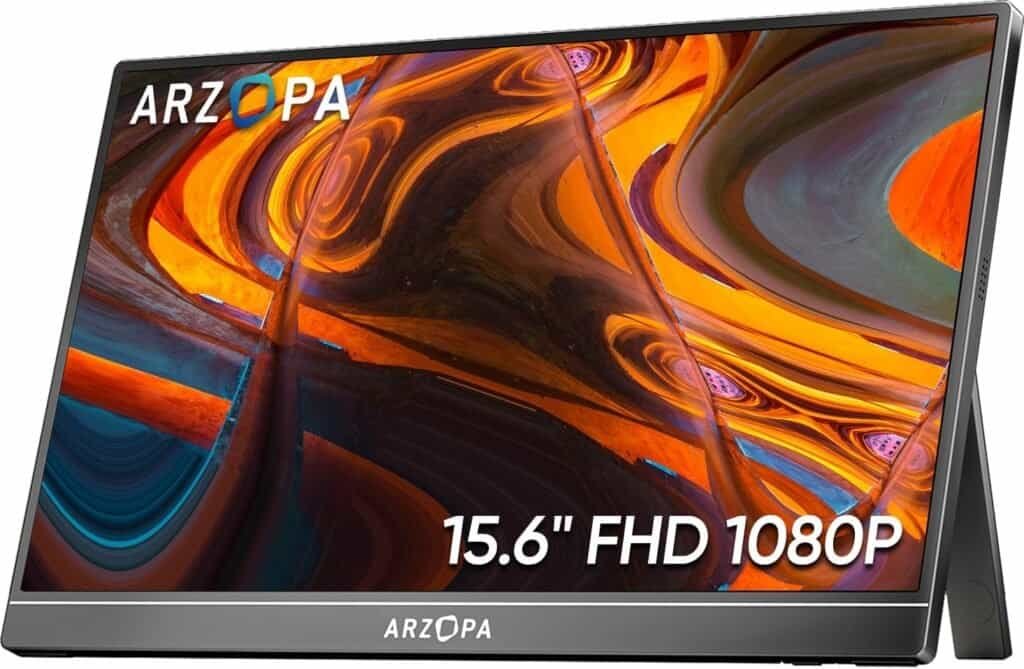
The monitor feels lightweight but not as premium as some more expensive brands. However, for the price range, the build quality is still quite good and perfectly usable for travel and remote work setups.
Quick Verdict
- Best for: People who want an affordable second screen for travel, remote work, or studying without spending too much.
- Not ideal for: People who want an affordable second screen for travel, remote work, or studying without spending too much.
- Bottom line: People who want the lightest possible monitor or need very high build quality and colour accuracy.
Design and Portability
size and Weight
Most ARZOPA portable monitors are:
- 15.6”
- Full HD
- Slim design
- Lightweight enough for backpacks
- Easy to carry with a laptop
It is slightly heavier than premium portable monitors like the Lenovo ThinkVision M14, but still very reasonable for travel.
It fits easily in:
- Laptop backpacks
- Carry-on luggage
- Laptop sleeves
- Travel work setups
For most travellers and remote workers, the size is actually very good because the screen feels large enough to work comfortably.
Magnetic Cover and Stand
The ARZOPA monitor comes with a magnetic cover that folds into a stand.
This works well for:
- Hotel desks
- Airbnb tables
- Café tables
- Temporary work setups
The stand is not extremely stable on very small tables, but for most situations it works fine.
This type of cover is common on many portable monitors and is useful because it protects the screen while travelling.
Setup and Connectivity
One advantage of the ARZOPA monitor is that it usually includes multiple connection options, such as:
- USB-C
- Mini HDMI
- USB power
This makes it compatible with:
- Laptops
- Some smartphones
- Tablets
- Gaming consoles
- Cameras
In most cases, the easiest setup is using USB-C, where one cable handles power and display.
Setup is usually:
- Connect USB-C cable
- Plug into laptop
- Monitor turns on automatically
Very simple.
Real Use While Travelling
This monitor works well for typical travel and remote work situations such as:
- Writing
- Emails
- Spreadsheets
- Research and writing side by side
- Video calls
- Website management
- Content creation
- Online study
- Basic photo editing
- Coding
- Managing multiple windows
For many people, the biggest benefit is simply having a second screen so they don’t have to constantly switch between tabs.
This is especially useful when working from:
- Airbnbs
- Hotels
- Hostels
- Cafés
- Co-working spaces
- Airports
A portable monitor like this helps turn temporary spaces into functional workspaces.
Pros and Cons
Pros
- Affordable compared to premium portable monitors
- Large 15.6” screen
- Multiple connection options (USB-C and HDMI)
- Easy plug-and-play setup
- Good for travel and remote work setups
- Works with laptops, phones, and consoles
- Good value for money
- Protective cover included
Cons
- Build quality is not as premium as ASUS or Lenovo
- Slightly heavier than premium portable monitors
- Cover stand is not very adjustable
- Brightness and colour accuracy are average
- Long-term durability may be lower than premium brands
Who This is For (and Who Should Skip it)
Ideal for:
- People who work from a laptop and want a second screen
- Remote workers and digital nomads on a budget
- Students who study with multiple documents open
- People who travel occasionally and want a portable setup
- People building a portable office setup
- Writers, programmers, marketers, designers (non colour-critical work)
- People who work from cafés, Airbnbs, hotels, or co-working spaces
- People who want to try a portable monitor without spending too much
- Anyone who is tired of switching between tabs all the time
Skip it if:
- People who want the lightest portable monitor possible
- People who travel constantly and want premium build quality
- Professional photographers or video editors who need very accurate colours
- People who mostly work from a fixed desk with a normal monitor
- People who want a very adjustable or very stable built-in stand
- People looking for a very bright screen for outdoor use
- Gamers looking for high refresh rates
How it Compares to Alternatives
Compared to the ASUS ZenScreen, the ARZOPA is cheaper but has slightly lower build quality and is a bit heavier. The ASUS is more premium and better for frequent travellers, while the ARZOPA is better for people on a budget.
You can read the full ASUS ZenScreen Review here.
Compared to the Lenovo ThinkVision M14, the ARZOPA has a larger screen and is much cheaper, but the Lenovo is lighter, more stable, and more travel-friendly.
Check the full Lenovo ThinkVision M14 Review here.
Quick comparison summary
| Monitor | Best For |
|---|---|
| Lenovo ThinkVision M14 | Best lightweight premium option |
| ASUS ZenScreen MB16AC | Best overall balance |
| ARZOPA Portable Monitor | Best budget option |
If you only need a second screen occasionally or want to test a portable setup without spending too much, the ARZOPA is a very good entry option.
bEST uSE cASES
- Travel and remote work setups
- Portable dual-screen laptop workspace
- Budget portable office setup
Price and Value for Money
The ARZOPA portable monitor is usually much cheaper than premium portable monitors, which makes it a very good value option for people who want a second screen but don’t want to invest too much.
It may not have the same premium feel as more expensive monitors, but for writing, emails, spreadsheets, studying, and general remote work, it does the job very well for the price.
Price and value for money:
One of the best budget portable monitors available — not premium, but very good value if you want a second screen for travel or remote work without spending too much.
Final Verdict
The ARZOPA portable monitor is a good option for people who:
- Work from a laptop often
- Travel occasionally or frequently
- Study online
- Want a second screen
- Are building a portable work setup
- Want a budget option first
It may not be the most premium portable monitor, but it can still be a very useful tool for improving productivity and making laptop work more comfortable.
A portable work setup does not need to be expensive.
It just needs to be portable, simple, and repeatable.
- if you’re unsure how to start your remote office setup, read our How to Create a Remote Life (Without Burning Everything Down)
- This product also appears in our Best Portable Monitors for Travel & Remote Work (2026)